chuck wrote:Yeah, Office 2016 is an absolute pig, performance wise.
Partially because it's Office 365 with your computer acting as "The Cloud". When you install 2016 it also installs a baby web server that Office "talks to" (explicitly on a Mac, I believe on Windows it exploits/"enhances" the web service tools built into Windows Explorer (not the browser, the file management tool)).
Because of cloud security issues a lot of institutions shied away from Office 365. You could enable "local" storage in 365 to get around the long term cloud storage issue but the temp/scratch files were still being cached on the net.
You can also turn on Cloud storage in 2016. I suspect that the later is a compromise on Microsofts part when customers really balked at the fee for service model for 365. Better to collect some fee's for storage than to lose and entire segment of the market.
There's a lot I didn't know about 2016 before pulling the trigger. I suspect that I am stuck. The problem is really two-fold. First, the real cause of the issue was the corruption of the PST file. That was caused by repeated importing of e-mails from the server (think 13,000 messages repeatedly loaded), driving the size of the PST file past what Outlook 2007 could safely handle. The file got corrupted. Attempts to repair it were cumbersome and time-consuming, but ultimately successful. However, there were casualties - like the calendar. Calendars and e-mail messages are kept in separate PST files. I didn't even know the calendar PST was damaged. Anyway, my entries for the next 3 months (maybe longer) are just gone. I've got e-mails for things in 1969 (didn't know about them

) and a reminder to file my PA taxes in 2743!

Second, Outlook 2016 just seems to be very slow. A video I just saw comparing 2010 and 2016 shows that significantly larger amounts of resources are consumed by 2016. Wish I'd seen that on Monday. What a pig.
The bottom line is that the damage has been done. Even if I de-install Outlook 2016, I really need to shrink the PST file and update the calendar. My hope is that performance will improve. If not, then I need to pray that a reversion to Outlook 2007 will go smoothly and yield a running e-mail system. It's almost a lose-lose scenario.
And it's keeping me from doing much, if any, modeling.

I really didn't count on doing this much IT support in my retirement.
chuck wrote:BOT, piers really look great. Concrete/stone weathering is more an issue of what's in the concrete or the type of stone and what is the primary weathering agent. Runoff from rain water, rainwater that's carrying air pollutants, direct air pollution and what's polluting the air? The mill probably threw off a lot of sulfur/sulfates and carbonates. There was probably a fair amount of soot as well.
I think what you've done looks great/realistic. You can airbrush the air pollution with light misting and then uses vertical washes for "runoff". Runoff tends to be heaviest wherever there is a transition from horizontal to vertical. A flat or a fan brush can be quite useful, touch the edge and then drag downward removing pressure from the stoke as you move downward. Practice to get a feel for the brush/paint/surface.
What's polluting the air in the Ohio River valley?

OMG, pick 'em! Let's see - coal fired blast furnaces, open hearths, power plants, coke plants, air-borne graphite, soot from steam locomotives. Here, take your pick.
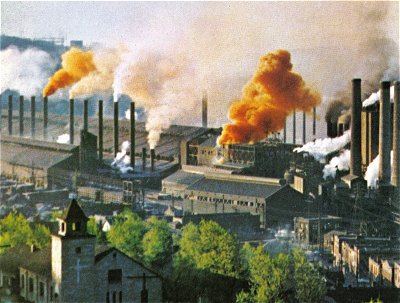
- weirton.jpg (40.04 KiB) Viewed 4087 times
I appreciate the kind words, but I'm not yet comfortable with the look of this pier. I am pursuing a couple of alternate strategies. One involves the application of brick paper to the pier, possibly followed by a camo texture paint (that I used on the base of the stone arch). It's sort of grayish-green. Some application of streaking rust, scale, and soot might do the trick. The second skips the brick paper but does all the rest.
The more I think about it, another photo expedition focused on the piers seems to be required.
George