Thanks guys.
Now that I have run it some it seems to be improved on it's starting and slow running. I will put up more pictures soon.
Allan
Squaw Creek Coal U36C project
Re: Squaw Creek Coal U36C project
I have come to a dead end on this because I don't have a way to get the correct lettering. I need to have the lettering first so I can match the stripe to it.
Allan
Allan
-
bob turner
- Posts: 13427
- Joined: Sat Jan 13, 2007 7:57 pm
Re: Squaw Creek Coal U36C project
La Belle has taken over my decal supply. He is working on a Mobilgas decal from a photo - if that works, I suggest submitting your photo.
I provided his predecessor with a photo of the top car, and the decals on the bottom car were the result. $25. Cheap. I do not know what the new guy charges, but he owns the software.
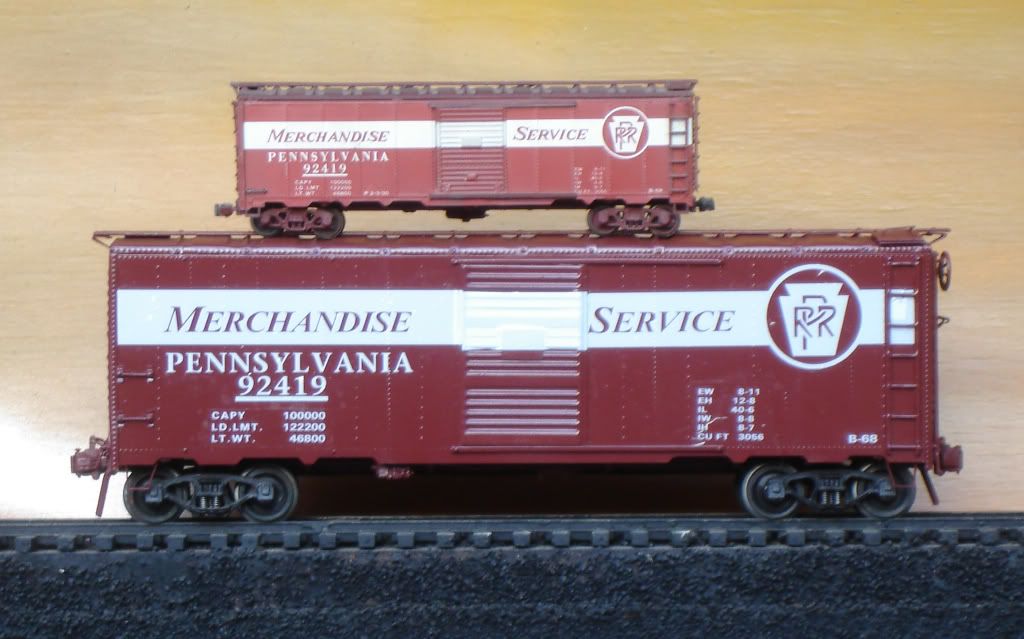
I provided his predecessor with a photo of the top car, and the decals on the bottom car were the result. $25. Cheap. I do not know what the new guy charges, but he owns the software.

-
bob turner
- Posts: 13427
- Joined: Sat Jan 13, 2007 7:57 pm
Re: Squaw Creek Coal U36C project
And speaking of sending the photo, it is such a stunning paint scheme - I cannot seem to get it into my saved photos on the iPad.
-
R.K. Maroon

- Posts: 3079
- Joined: Tue Feb 22, 2011 9:20 pm
Re: Squaw Creek Coal U36C project
Allan --
I don't know if you have run across this yet but I think it should be sufficient as a starting point for decals:
It would take some scaling and cleanup but it's better than starting from just an oblique photo. I may even take a shot at cleaning up that herald myself just for fun. More later.
Jim
I don't know if you have run across this yet but I think it should be sufficient as a starting point for decals:
- Squaw Creek 01.png (351.58 KiB) Viewed 9352 times
It would take some scaling and cleanup but it's better than starting from just an oblique photo. I may even take a shot at cleaning up that herald myself just for fun. More later.
Jim
The link below any photo will display the image full size
-
R.K. Maroon
- Posts: 3079
- Joined: Tue Feb 22, 2011 9:20 pm
Re: Squaw Creek Coal U36C project
I had a couple of hours on an airplane today so I started in on the Squaw Creek Herald. The night before I downloaded a free image manipulation program called GIMP that is supposedly very similar to Photoshop, which costs money. I have never used Photoshop and I had no on-line help at 33,000 feet so the learning curve was painful. But I managed to make some progress. The first step was to crop the herald from the photo of the locomotive:

Oh man, that is small. Next step, enlarge it:

Oy vey -- the resolution is terrible. Look how pixelated it is. Next, remove the background color, with a clear decal there is no reason to have the background. In fact, you don't want the background, as it may not be a perfect color match the the paint:

So this is where a program like Photoshop or GIMP separates itself from a basic editor. The removal of the background here is almost a one-step process. The trick is for the software to automatically establish the boundaries of the areas to be changed from those that are to remain.
We will want the image to have more resolution, and again GIMP has this capability. It interpolates to create the same image but with a lot more pixels. The number of pixels is set by the user. If you pick too many then editing becomes tedious if any manual steps are necessary (which to a beginner like me is almost guaranteed -- faster to do certain things manually than to try to figure out how to do them automatically. These editors have a lot of features and the learning curve is steep. At any rate, here is the image with higher resolution:

It's a start. Further progress will be slower, but at least I am off of square one with the editor. I have thought about learning to use one of these for many years but just never had a reason good enough to get me going.
Jim

Oh man, that is small. Next step, enlarge it:

Oy vey -- the resolution is terrible. Look how pixelated it is. Next, remove the background color, with a clear decal there is no reason to have the background. In fact, you don't want the background, as it may not be a perfect color match the the paint:

So this is where a program like Photoshop or GIMP separates itself from a basic editor. The removal of the background here is almost a one-step process. The trick is for the software to automatically establish the boundaries of the areas to be changed from those that are to remain.
We will want the image to have more resolution, and again GIMP has this capability. It interpolates to create the same image but with a lot more pixels. The number of pixels is set by the user. If you pick too many then editing becomes tedious if any manual steps are necessary (which to a beginner like me is almost guaranteed -- faster to do certain things manually than to try to figure out how to do them automatically. These editors have a lot of features and the learning curve is steep. At any rate, here is the image with higher resolution:

It's a start. Further progress will be slower, but at least I am off of square one with the editor. I have thought about learning to use one of these for many years but just never had a reason good enough to get me going.
Jim
The link below any photo will display the image full size
-
Tom Dempsey
- Posts: 1002
- Joined: Mon Dec 23, 2013 10:15 pm
Re: Squaw Creek Coal U36C project
You're doing the right thing with the wrong programs. You need to bring the image into a vector artwork program as a template, redraw as vector based art, and then all the pixelation problems will go away because they no longer exist. It will also make your decal printer a very happy fellow.

Re: Squaw Creek Coal U36C project
Tom Dempsey wrote:You're doing the right thing with the wrong programs. You need to bring the image into a vector artwork program as a template, redraw as vector based art, and then all the pixelation problems will go away because they no longer exist. It will also make your decal printer a very happy fellow.
Woukd someone translate this for me? Please?


roger
I support thread drift.
If God didn't want women to be looked at, He would have made 'em ugly. RAH
I support thread drift.
If God didn't want women to be looked at, He would have made 'em ugly. RAH
-
bob turner
- Posts: 13427
- Joined: Sat Jan 13, 2007 7:57 pm
Re: Squaw Creek Coal U36C project
Our decal printer has a vector program. Jim is just showing what can be done. I am interested enough to see if I can get Rick (La Belle) to add them to my Mobilgas order. If he has the same general philosophy as Jim Wilhite had we can stick them on the same sheet for the same charge.
Of course, once I do that, I too will be sucked in to finding a set of these Penn-Erie castings. I already have too many models.
Of course, once I do that, I too will be sucked in to finding a set of these Penn-Erie castings. I already have too many models.
-
R.K. Maroon
- Posts: 3079
- Joined: Tue Feb 22, 2011 9:20 pm
Re: Squaw Creek Coal U36C project
Roger --
There are programs that draw by primarily relying on geometric shapes, such as straight lines and circles. These are often called CAD (computer aided drafting/design) programs. AutoCad is the most famous of these, but office software tools like Word and Powerpoint also have simple "draw" programs that are very much the same thing. These are different from "paint" programs that emulate free-hand pen and brush strokes to create images. The photo editing software I am using is more like a paint program than a draw program.
So the question is what is better? Tom is suggesting that I redraw the image using a draw package, instead of cleaning it up with a paint-like editor. I plan to do both. It will be easier to replace the outer circle on the herald with drawn circle imported from draw program than to try to "paint" it perfect (no chance there). However, my experience with draw programs is that they are horribly tedious when trying to create an image such as the silhouette of the squaw here. The question is akin to: "How many simple geometric shapes does it take to create that silhouette?" Answer: Too many for me. So I will continue with the photo editor for the silhouette.
Also, I think most would agree that the last image I showed, in which the heavily pixelated image has been smoothed out with interpolation, is a far better starting point for work on this image than the original, regardless of whether one proceeds with a paint or draw program from here. The GIMP photoeditor is the only program I have that has the power to do this interpolation, so from my point of view is not the wrong program, as Tom claims, but exactly the right program.
Jim
There are programs that draw by primarily relying on geometric shapes, such as straight lines and circles. These are often called CAD (computer aided drafting/design) programs. AutoCad is the most famous of these, but office software tools like Word and Powerpoint also have simple "draw" programs that are very much the same thing. These are different from "paint" programs that emulate free-hand pen and brush strokes to create images. The photo editing software I am using is more like a paint program than a draw program.
So the question is what is better? Tom is suggesting that I redraw the image using a draw package, instead of cleaning it up with a paint-like editor. I plan to do both. It will be easier to replace the outer circle on the herald with drawn circle imported from draw program than to try to "paint" it perfect (no chance there). However, my experience with draw programs is that they are horribly tedious when trying to create an image such as the silhouette of the squaw here. The question is akin to: "How many simple geometric shapes does it take to create that silhouette?" Answer: Too many for me. So I will continue with the photo editor for the silhouette.
Also, I think most would agree that the last image I showed, in which the heavily pixelated image has been smoothed out with interpolation, is a far better starting point for work on this image than the original, regardless of whether one proceeds with a paint or draw program from here. The GIMP photoeditor is the only program I have that has the power to do this interpolation, so from my point of view is not the wrong program, as Tom claims, but exactly the right program.
Jim
The link below any photo will display the image full size
-
Tom Dempsey
- Posts: 1002
- Joined: Mon Dec 23, 2013 10:15 pm
Re: Squaw Creek Coal U36C project
Well, OK, but I don't think there are any decals of any sort printed from any pixelated images. So, why not start by doing it right, that way, your decal printer won't have to import your artwork into a vector program and fix the work in order to print the decal? Just sayin'
-
R.K. Maroon
- Posts: 3079
- Joined: Tue Feb 22, 2011 9:20 pm
Re: Squaw Creek Coal U36C project
Tom, thank you for letting us know that decal printers are meant to work with vector images. As it is, I don't have a decal printer. I am doing this for fun as an excuse to learn GIMP/Photoshop. If it is of benefit to Allan, great. If not, neither he nor I is worse for it.
Jim
Jim
Last edited by R.K. Maroon on Fri Dec 11, 2015 9:26 pm, edited 1 time in total.
The link below any photo will display the image full size
-
bob turner
- Posts: 13427
- Joined: Sat Jan 13, 2007 7:57 pm
Re: Squaw Creek Coal U36C project
So far, so good. How about looking for a font that matches the big side lettering, and I will get Rick started. I am sure that image of the squaw will be good enough for now. I do need to figure out how to capture an image from the forum and put it in my iPad.
No, wait. I do have it there! I was looking for it at the end, not the middle of my saved photos!
No, wait. I do have it there! I was looking for it at the end, not the middle of my saved photos!
-
R.K. Maroon
- Posts: 3079
- Joined: Tue Feb 22, 2011 9:20 pm
Re: Squaw Creek Coal U36C project
Seeing Allan's post on the foamer ("This guy is wierder than us") reminded me that I never posted any further progress on the Squaw Creek herald. The last time I posted it looked like this:
I managed to get it quite a bit better:

It's not perfect but remember it wouldn't be printed as large as you see it here. So, for example, here it is at 1/2, 1/3, 1/4, 1/5 and 1/6 size:


I left it there, in part because I am not sure where Allan is with the Squaw Creek project (what with his announced move to Quito).
Jim
I managed to get it quite a bit better:

It's not perfect but remember it wouldn't be printed as large as you see it here. So, for example, here it is at 1/2, 1/3, 1/4, 1/5 and 1/6 size:


I left it there, in part because I am not sure where Allan is with the Squaw Creek project (what with his announced move to Quito).
Jim
The link below any photo will display the image full size
Re: Squaw Creek Coal U36C project
I think those are nice looking.
roger
I support thread drift.
If God didn't want women to be looked at, He would have made 'em ugly. RAH
I support thread drift.
If God didn't want women to be looked at, He would have made 'em ugly. RAH
Return to “O-Gauge, 2-Rail, Model Railroading”
Who is online
Users browsing this forum: No registered users and 22 guests